Article Overview
The following article explains what monday.com subitems are, how they work, and when to use them.
Overview
(See Figure 1)
In monday.com, subitems are items that are nested under a parent item on a board. They are used to break down an item into smaller, related components while keeping all information organized within a single board. A parent item typically represents a high-level task, project, deal, or request. Subitems represent the individual steps, deliverables, or line items required to complete or manage that parent item.
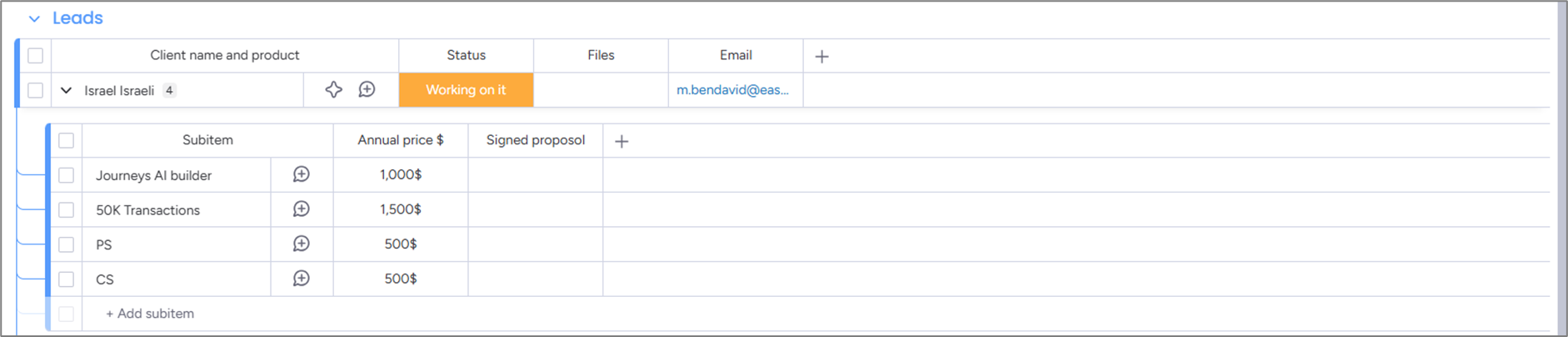
Figure 1: monday.com Subitems Example
How subitems work
Subitems appear directly beneath their parent item and can be expanded or collapsed using the arrow next to the item name
Subitems use their own column set, which is configured separately from the parent item’s columns
All subitems on a board share the same column configuration
Each subitem can have its own Status, People, Date, Numbers, or other supported column types
Some parent item columns can display summarized data from subitems, such as overall status or aggregated values
Subitems can be used in automations and integrations, based on the available features in your account
Common use cases
Subitems are commonly used to:
Break down tasks into smaller steps
Track phases or deliverables within a project
Manage line items such as invoice details, features, or test cases
Keep related work grouped under a single item without creating additional boards
When to use subitems
Use subitems when the work or data:
Is directly dependent on a single parent item
Does not need to exist independently across multiple boards
Can follow a shared column structure