Overview
An EasySend security log is a record of security-related events and activities that occur within the lifecycle of digital processes or EasySign documents. EasySend allows its customers to send security logs to their internal, traditional security information and event management (SIEM) systems.
Business Value
This integration means security teams don't have to monitor EasySend in isolation - security events flow directly into the tools they already use to detect threats, investigate incidents, and meet regulatory requirements. Sensitive customer data and digital signatures are already subject to strict compliance standards, and centralized logging makes it possible to demonstrate that oversight to auditors and regulators without extra manual work.
NOTE
Please note that the configuration of your security logs mechanism is done internally by EasySend. For additional information, please contact our support team.
Security Logs Events
The following is a list of security events included in the log:
All Events
Link Sent
Link Opened
Completed Step
Data Submitted
Completed
Authentication - this event includes One Time Password (OTP) events such as:
OTP sent
OTP resent
OTP passed
OTP failed
Session blocked
Delivery Method
Security logs are delivered in a JSON file format, for example:
{
    "@timestamp": "2024-11-20T10:37:42.943305",
    "client": {
        "ip": "::1"
    },
    "ecs": {
        "version": "8.11"
    },
    "event": {
        "action": "OPENED",
        "timezone": "localhost"
    },
    "geo": {
        "country_name": "localhost",
        "region_name": "localhost"
    },
    "label": {
        "app_type": "digitalJourney",
        "auth_action": null,
        "auth_page": null,
        "authentication_method": null,
        "authentication_status": null,
        "business_group": "Integration Team",
        "business_group_id": "lVC4f0Ebz9JwrHLUr4YK",
        "customer_id": "easysend-rnd",
        "deploy_timestamp": "2024-11-20T09:44:51.729859",
        "is_co_browsing_on": true,
        "master_rid": "EOBxZR0U6yg",
        "page_analytics_id": "4ecc8d8a-d798-444f-ad48-ef77d4c959d1",
        "page_index": 0,
        "page_name": "page0",
        "player_version": "30.7.11",
        "process_id": "ERdleNrQkKfq7vnOkMRc",
        "process_multi_language": "en",
        "request_id": null,
        "rid": "JAmCWofysTU",
        "role": "Customer",
        "source_type": "link",
        "source_value": "direct",
        "step_id": "23a81e9e-90ee-4bc7-be26-4466e155c8c6",
        "step_index": 0,
        "web_flow_name": "eyal-test-new",
        "webflow_id": "iwha6jbbalxrnqjz89bk"
    },
    "organization": {
        "name": "Easysend"
    },
    "os": {
        "family": "macOS",
        "full": "macOS 10.15 Catalina"
    },
    "service": {
        "environment": "LOCAL"
    },
    "url": {
        "domain": "http://localhost:4200",
        "full": "http://localhost:4200/easysend-rnd/iwha6jbbalxrnqjz89bk/page0/0?rid=JAmCWofysTU"
    },
    "user_agent": {
        "device": {
            "name": "desktop"
        },
        "name": "Chrome",
        "original": "Mozilla
        "os": {
            "browser_language": "en-US",
            "browser_platform": "MacIntel",
            "is_mobile_device": false,
            "is_verified_bot": false
        }
    }
}
Getting Access
This feature is available as a paid add-on and is not included in the standard product offering. To enable this feature and receive pricing information, please contact our Support team.
Security Logs Configuration
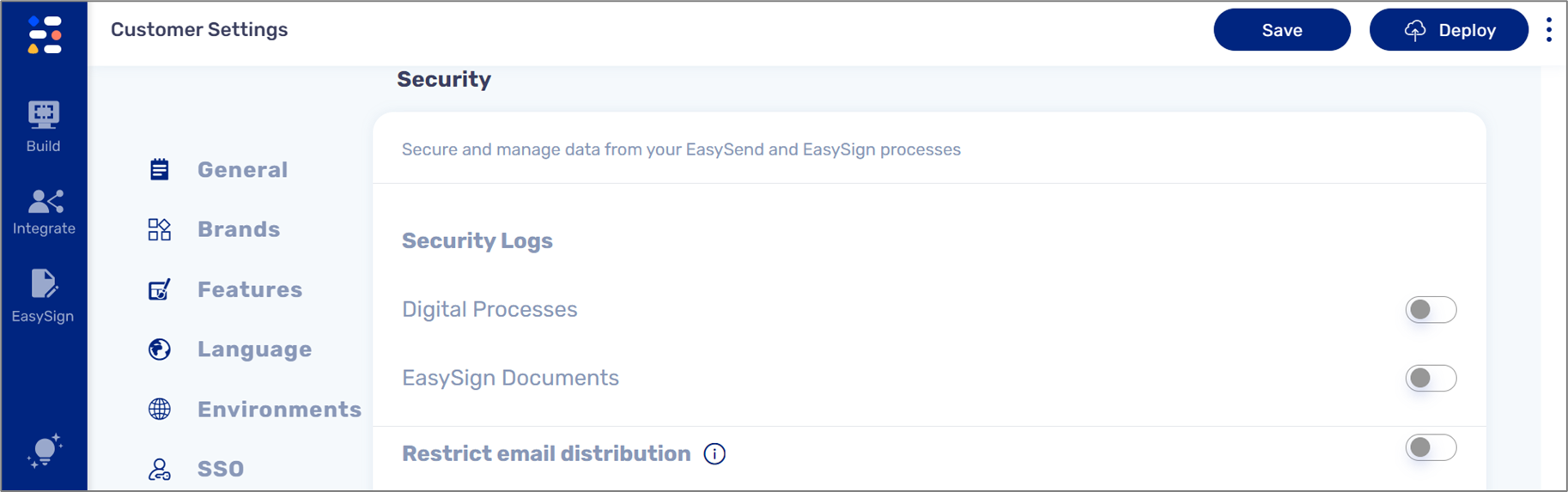
(See Figure 1 and Figure 2)
Security logs can be enabled for digital processes and/or EasySign documents.
Figure 1: Security Logs
Once the switch is toggled to on, the following options appear:
Select Service dropdown - this dropdown contains a list of services; the selected service will be the one configured to send the security log. A security log can be sent in one of the following service steps:
Email
Rest API
File storage
Encode/decode
NOTE
Because the security logs are sent through a service, it is possible to configure a different log per environment (DEV/PROD).
Events dropdown - this dropdown contains a list of security events to include in the log:
All Events
Link Sent
Link Opened
Completed Step
Data Submitted
Completed
Authentication - this event includes One Time Password (OTP) events such as:
OTP sent
OTP resent
OTP passed
OTP failed
Session blocked
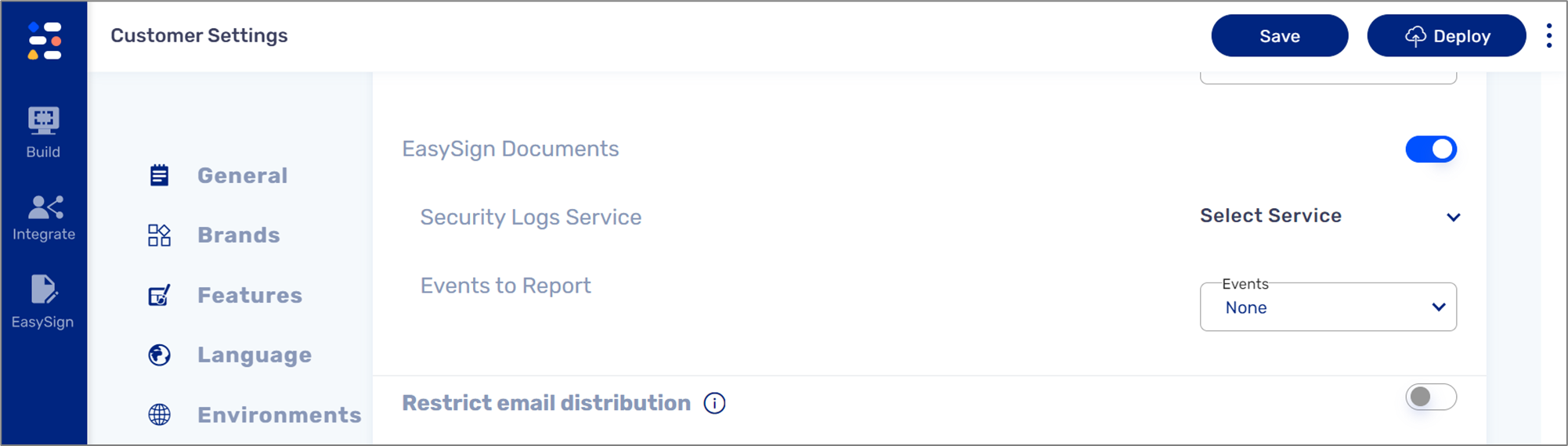
Figure 2: Configuring Security Logs